Experience the complete m2 casino ecosystem directly through your mobile browser without occupying local storage. Our high-fidelity web version delivers the exact same speed, security, and game selection as a desktop terminal. Follow the guides below to complete your m2 register process and add a shortcut icon directly to your home screen for rapid access.
Access the full m2 casino ecosystem instantly through your mobile browser without using up local storage. Follow this exact 3-step guide to complete your m2 register process, bind your payment details, and save the platform directly to your iPhone or iPad home screen.
创建个人档案并验证 TAC:
进入注册页面以创建您的全新 M2 Casino 账户。在“手机号码(Mobile No)”栏中输入您的电话号码(例如:0123456789),轻击“获取 TAC(Get TAC)”,并输入收到的短信验证码。设置一个至少包含 6 位字母和数字的密码(请勿使用特殊字符)。
绑定安全银行信息:
输入您的全名——此姓名必须与您的银行账户开户名完全一致,否则未来的资金交易将被系统自动拒绝。选择您的银行,输入您的银行账号,然后点击“提交”以授权您的安全账本。
将网页应用保存至主屏幕:
在移动端 Safari 浏览器中浏览 M2 大厅时,轻击“分享”按钮(屏幕底部带有向上箭头的正方形图标)。滚动选项列表,轻击“添加到主屏幕”,并进行确认。
顺畅无阻的畅玩体验: 一个 M2 的快捷方式图标现在将出现在您标准的应用软件旁。随时轻击它即可执行即时 M2 登录、管理您的钱包并直接投入游戏。如果您之后更倾向于完全独立的应用程序布局,您可以随时从您的新会员菜单中直接完成原生 M2 下载。
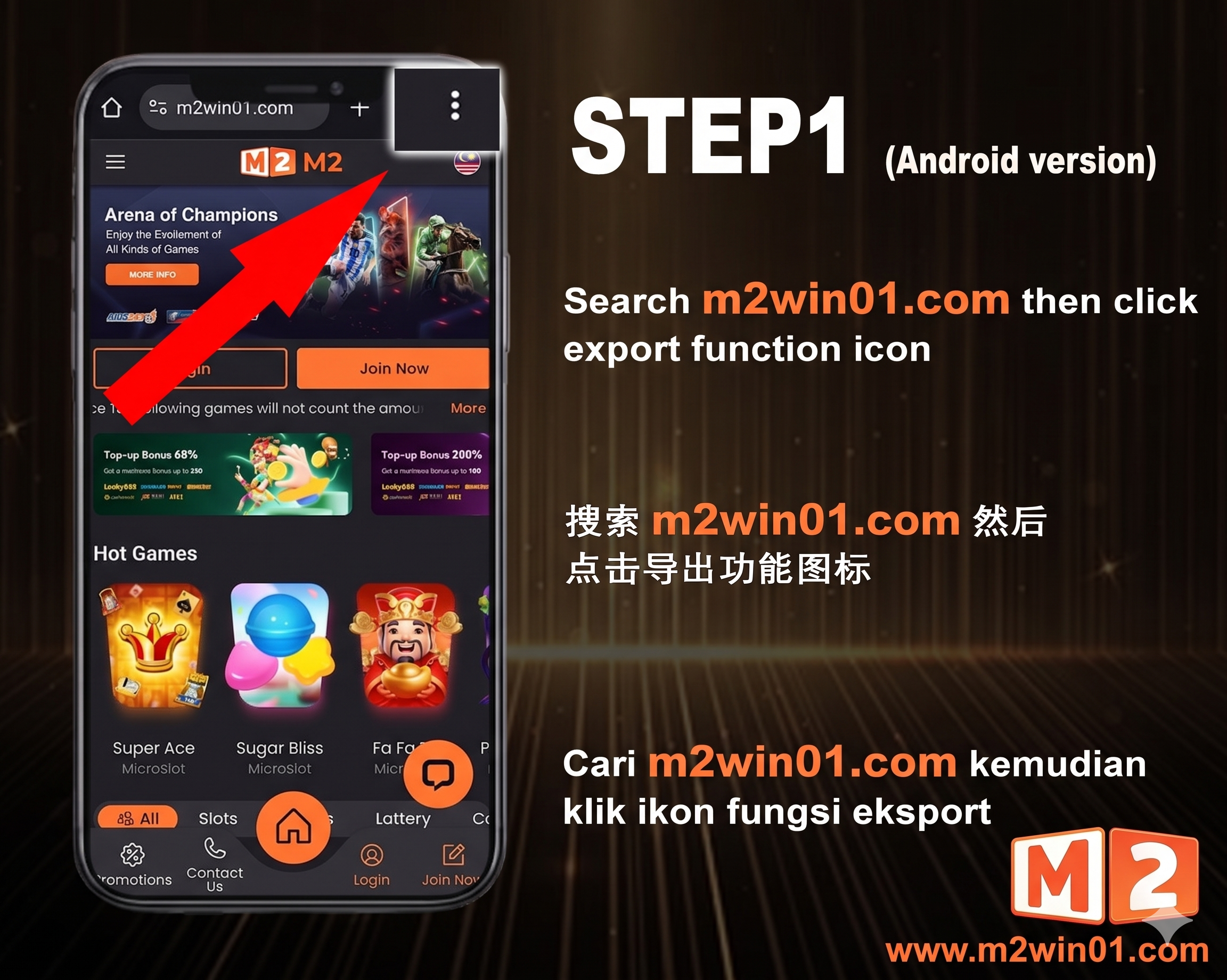
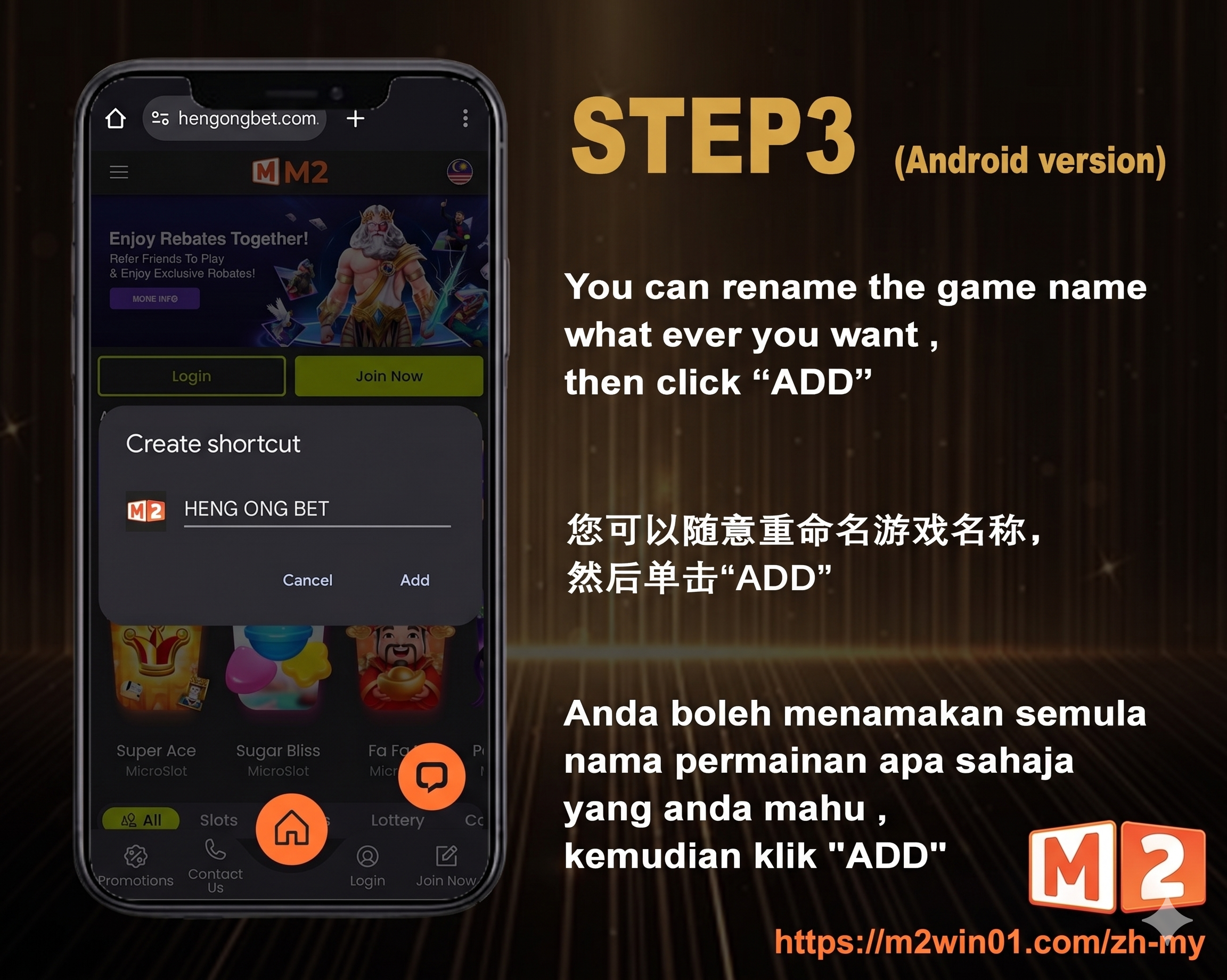
Get immediate access to the m2 casino platform directly through your mobile browser. Follow this clean 3-step guide to complete your m2 register process, link your bank details securely, and pin the shortcut icon directly to your Android home screen.
创建个人档案并验证 TAC:
导航至注册菜单以开启您的 M2 Casino 账户。在“手机号码”栏中输入您的电话号码(例如:0123456789),轻击“获取 TAC”,并输入收到的短信验证码。创建一个至少包含 6 个字符且仅由字母和数字组成的密码(不允许使用特殊字符)。
绑定您的银行账户:
输入您的法定全名——此姓名必须与您银行账户上的姓名完全一致,否则您的存款和提款申请将被拒绝。选择您的银行供应商,输入您的账号,然后点击“提交”以激活您的钱包。
将快捷方式锁定至主屏幕:
在谷歌浏览器(Google Chrome)中打开 M2 首页时,轻击浏览器窗口右上角的三个垂直圆点。从菜单列表中选择“添加到主屏幕”,并确认弹出提示,即可将快捷方式图标放置在您的手机桌面上。
顺畅无阻的畅玩体验: M2 图标现在已在您的安卓主屏幕上激活。每当您想要进行快速 M2 登录、绕过浏览器 URL 输入并直接跳入游戏现场时,只需轻轻一击即可。如果您日后更喜欢原生应用程序界面,您可以随时选择从安全的会员侧边栏中进行完整的 M2 下载。